Your audit function has outgrown the spreadsheet. Run it in Scrutive.
Upload your risk and control matrix from Excel and you are working the same day. Every finding gets an owner, a due date and an independent sign-off, and your leadership pack comes straight out of the system.
Built by Irfan Azam, a practising Head of Internal Audit · About Scrutive · Export everything to Excel at any time
 Imports from Excel · Works with any company email · Microsoft 365 optional
Excel is a fine calculator. It is a poor audit system.
The audit work is sound. The spreadsheet around it is where findings go missing, dates slip and two days disappear before every leadership review.
Findings that quietly stay open
Agreed actions live in a tracker nobody owns. Due dates are overwritten, the same issue returns next year, and "Closed" is typed by the person who was meant to fix it.
Scrutive: only an independent verifier can closeChasing owners by email, every week
You send the reminders, collect the replies, find the attachments and update the cells by hand. The follow-up takes longer than the audit did.
Scrutive: one-click owner replies, automatic escalationA leadership pack rebuilt by hand
Plan progress, opinions and overdue actions sit in different files. Each pack takes days to assemble and is out of date when it is printed.
Scrutive: the pack comes from the live recordsBring your Excel. Be working the same day.
Leaving a spreadsheet should not mean retyping it. Upload your workbook, check what came in, and carry on from where you were.
Upload your workbook
Download the template, paste in your risk and control matrix and upload it yourself. No consultant and no project plan.
Check what came in
Controls, risks, owners and dates appear in your register. Correct anything on screen before your team sees it.
Q1
Print your leadership pack
Plan status, open findings, overdue actions and opinions come from the live records, ready to print.
The same audit work, without the spreadsheet tax.
Tracker_v7_FINAL (2).xlsx on someone's desktop.Six tabs in your workbook. One connected system here.
Every stage feeds the next, so the board sees the same facts your team works from, and nothing is retyped between the plan, the file and the report.
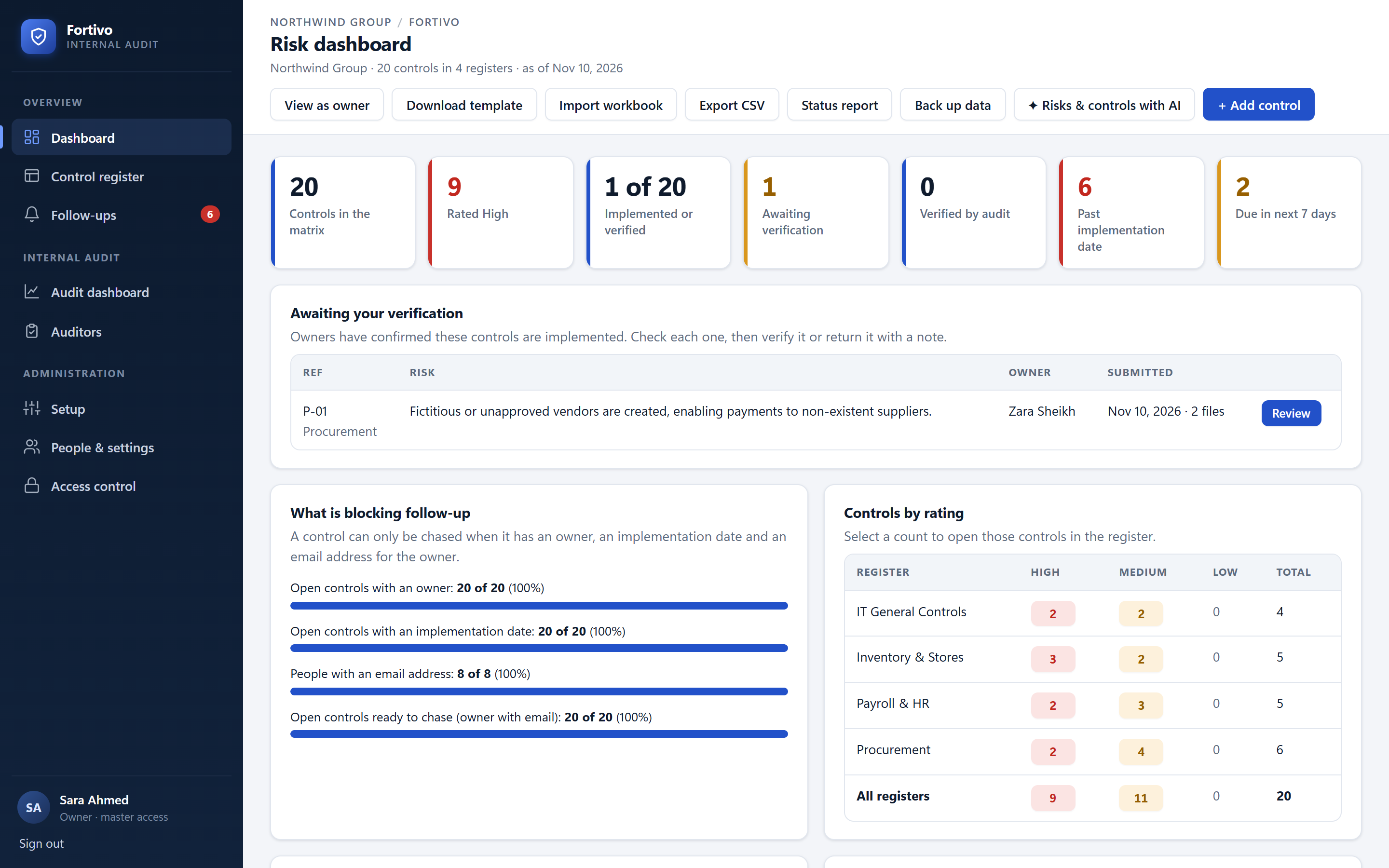
From "we fixed it" to verified, without chasing.
Owners confirm with one click from their inbox before each due date. Evidence is checked, and only an independent verifier can close the item.
- Automatic Yes / No follow-ups, with escalation to line managers
- Owners never verify their own work
- New dates approved by audit, with reasons on record
- Agreed audit actions flow straight into follow-up
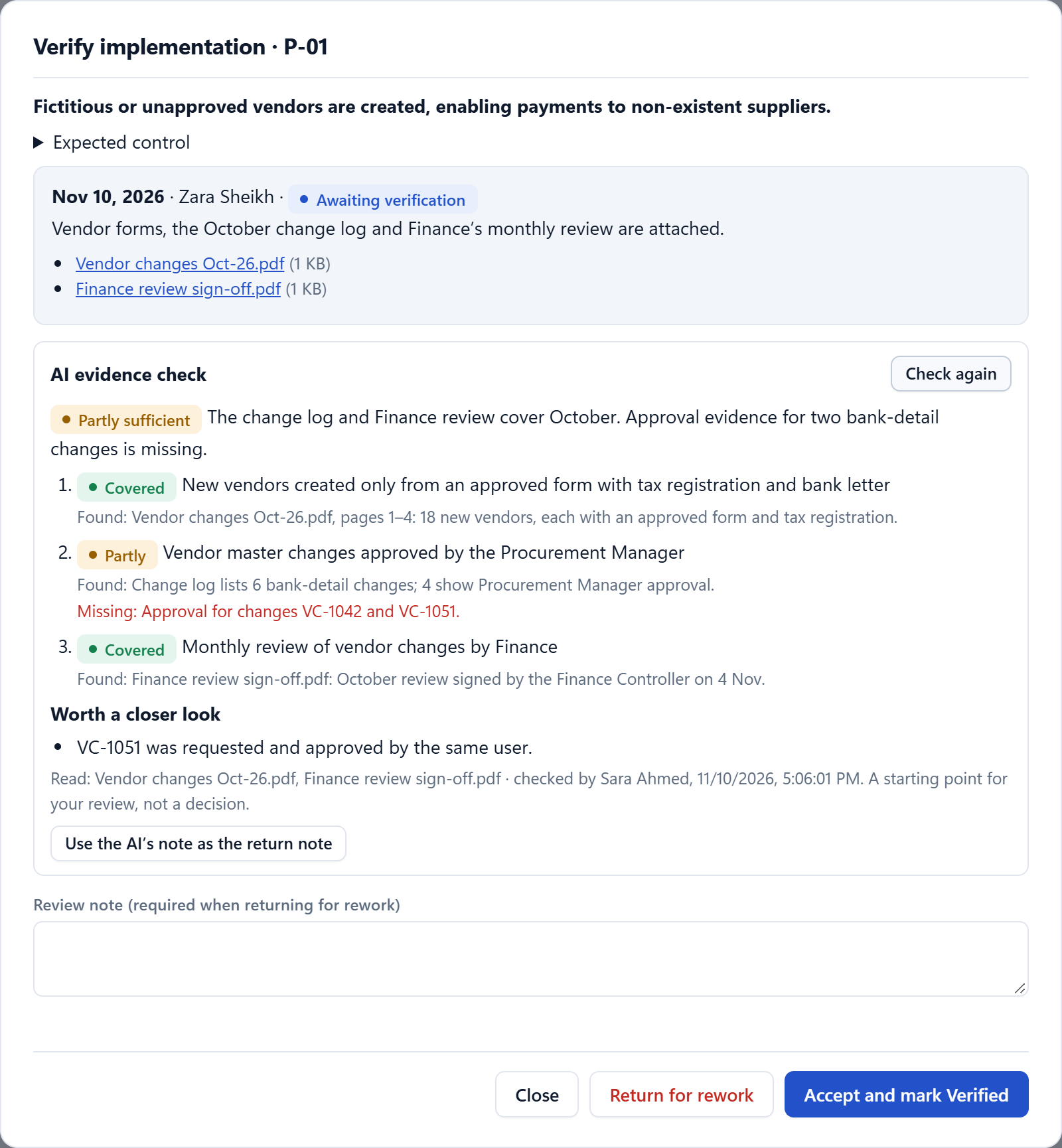
An audit file your reviewer can sign in minutes.
Every work paper holds the control, the test performed, the observation, the evidence and the sign-off trail. Preparers and reviewers are always different people.
- Work papers drawn straight from the control register
- Preparer and reviewer sign-off with review points
- Observations listed under Findings until each is raised
- Time logged against the audit budget
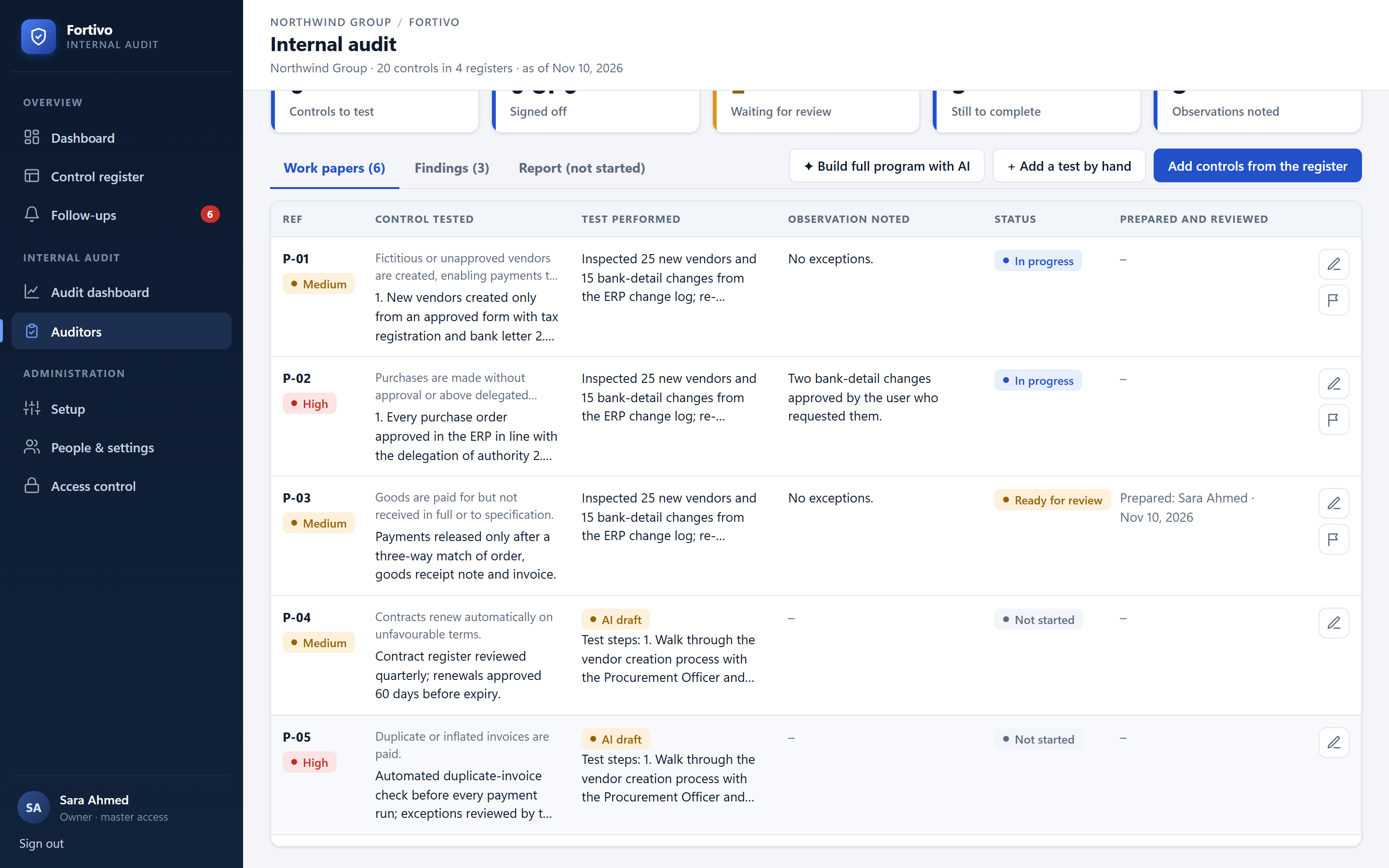
The heat map you used to colour in by hand.
Score each risk on likelihood and impact, before and after the control. The map updates itself, and every cell opens the controls behind it.
- Inherent and residual scoring on a 5 × 5 scale
- Ratings set by the score, the same way in every register
- Scores imported from your existing workbook
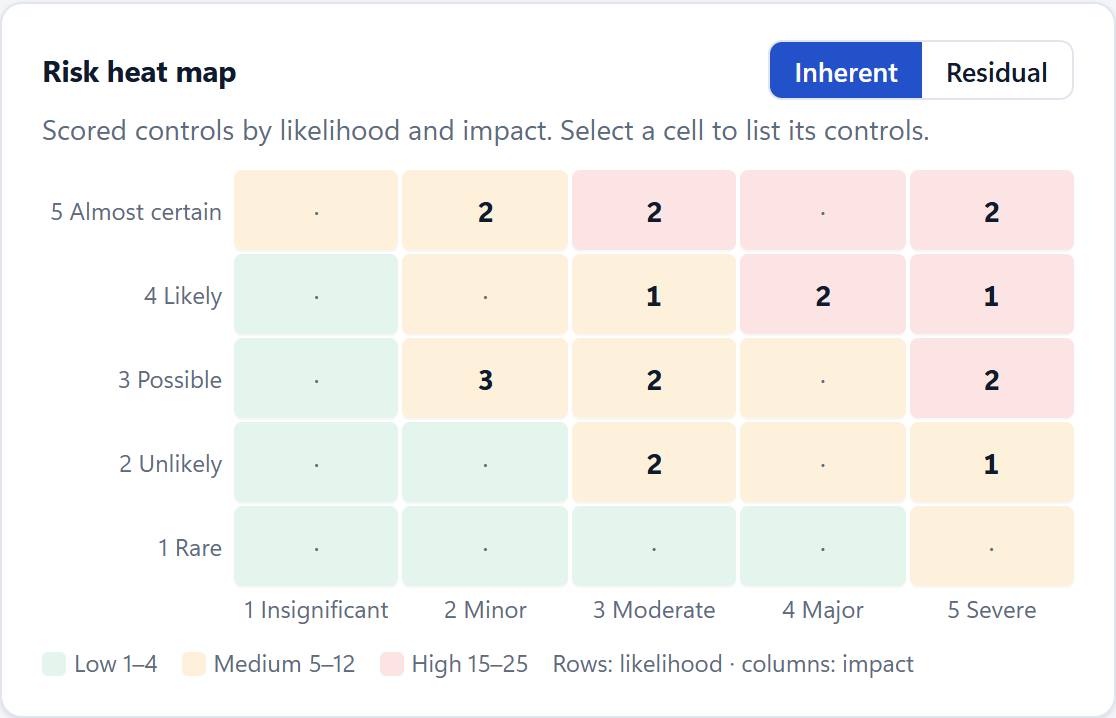
AI that does the groundwork. Auditors keep the judgement.
Built into the audit workflow, not bolted on as a chat window. Each capability produces a draft your team reviews, edits and signs. It can be switched off entirely.
Complete audit programs
Plans every area of the scope, then drafts risks, expected controls and 6 to 10 test steps each, with samples and red flags.
Evidence review
Reads the owner's files against each point of the control: covered, partly covered or missing.
Test execution
Tests the sample item by item against the control, lists exceptions and drafts the test performed and the observation.
Draft and redraft
Under every text box: draft an observation from the form, or correct the English of what you wrote, word for word.
The questions management, the audit committee, and your IT team will put to you.
What if we want to leave?
Export everything, any time. Your registers, findings and history come out as files you own. You are never locked in.
Who can see our findings?
A dedicated deployment for each customer, with access enforced per register and role, and a log of every change.
Can we trust AI with audit work?
It is off until you switch it on, every output is a marked draft, and an auditor signs every conclusion.
Will IT approve it?
We bring an IT review pack covering sign-in, data handling and hosting options, and we answer your questionnaire.
Audit teams who left the spreadsheet behind.
Scrutive has changed how my team spends its time. We no longer rebuild trackers and reports by hand, so our auditors focus on the audit work itself, and our reports are ready the moment we need them.
We have used Scrutive across several client engagements. It cut the hours our team spent on documentation and follow-up, which lowered our delivery cost and helped us deliver audits on time.
Scrutive keeps our findings and follow-ups in one place. We no longer maintain separate files and backups, the system remembers every observation's follow-up date, and our reports and follow-up are stronger than before.
Johnny & JugnuA multi-brand food business moved its control registers and audit follow-up out of spreadsheets and into Scrutive.
Read the storyBring one spreadsheet to the demo. Leave with a plan to retire it.
Forty-five minutes on the real product, with a scope you choose. No slide deck.
Book a live demo- Your own matrix uploaded live, in the demo
- An audit program drafted live for one of your audits
- The path from finding to verified close, end to end
- Your IT and security questions answered
What heads of internal audit ask us.
We run everything in Excel today. How do we move?
Download the Excel template, paste in your risk and control matrix and upload it. Controls, risks, owners and dates appear in your register, ready to check and correct on screen. You pay nothing until you accept your first leadership pack.
Can we still use Excel?
Yes. Registers import from Excel with a template, and you can export registers, status reports and a full data backup at any time. Scrutive replaces the spreadsheet as the system of record, not as a tool.
What is internal audit management software?
A system that runs the internal audit lifecycle in one place: the audit universe and risk-based plan, audit programs and work papers, evidence and review, findings with agreed actions, reports to management or the audit committee, and the follow-up of every action until it is verified. Scrutive replaces the spreadsheets, shared drives and email threads most functions still use.
How does Scrutive use AI, and who stays responsible?
Scrutive AI drafts audit programs, checks evidence against each point of a control, tests samples item by item and helps write and correct text. Every result is a draft: it is marked as AI, recorded with the model and files used, and becomes part of the audit only when an auditor reviews and accepts it. Work papers holding an AI draft cannot be sent for review until the auditor replaces it.
Does Scrutive follow the IIA Global Internal Audit Standards?
Scrutive is built around how the Standards expect a function to work: a risk-based plan approved by the board, independence declarations for each engagement, preparer and reviewer sign-off, review points, a final report issued by the Chief Audit Executive, quality review after issue and a retention policy. Scrutive does not certify conformance; it gives your function the structure and the evidence to show it.
Can we build the audit plan from risk?
Yes. The audit universe holds each auditable area with its owner, risk rating, risk factors and audit frequency. Areas due for audit and not yet in the plan are flagged, and the annual plan tracks scope, team, budget and status, with a change log once the plan is approved.
How are work papers prepared and reviewed?
Each work paper holds the control, the test objective, population, sample, test performed, observation, conclusion and evidence files. The preparer sends it for review; a different person signs it off or returns it with review points. Observations that need management action are listed under Findings so none is lost before the report.
How are findings followed up?
When the final report is issued, each agreed action goes to its owner with a target date. Owners confirm by one-click email before the date, attach evidence, or ask for a new date that audit approves. Only an independent verifier can close an action, and overdue items are escalated to line managers.
Do we need Microsoft 365?
No. Scrutive runs on its own: single sign-on with your identity provider (Google Workspace, Okta, Auth0 or any OpenID Connect provider) or its own approved accounts, follow-up emails through any company mail server, and evidence in its own secure storage. If you use Microsoft 365, it can also sign people in with Entra ID, send from your Outlook mailbox, add due dates to calendars, alert people in Teams and keep files in SharePoint, with permissions agreed with your IT team.
How is our data protected?
Each customer has a dedicated deployment and database. Access is enforced on the server per register and role, segregation of duties is built in, every change and email is logged, and AI is off until a master switches it on with a daily limit. An IT review pack is available during evaluation.
How long does implementation take?
Most functions start with a pilot on one register or one audit. Registers import from Excel with a template, email (and Microsoft 365, if you use it) is connected with your IT team, and owners, verifiers and auditors are onboarded by role, with a training manual and walkthrough videos.
How is Scrutive priced?
Starter is a flat monthly price for up to 3 users. Team is priced per user per month, in US dollars. Dedicated, with hosting in your own region or cloud, is quoted. Control owners who only answer follow-ups do not need a paid seat. See the Editions page for current prices.